Diagnosis & Testing: Self-Diagnostics: Notes
- To perform diagnostic tests using DRB-II, DRB-II must be in ABS MENU. At ABS MENU, fault codes and DRB-II test functions can be accessed. To reach ABS MENU, locate self-diagnostic connector. Connector is located on driver side under dash. See Fig 1
.
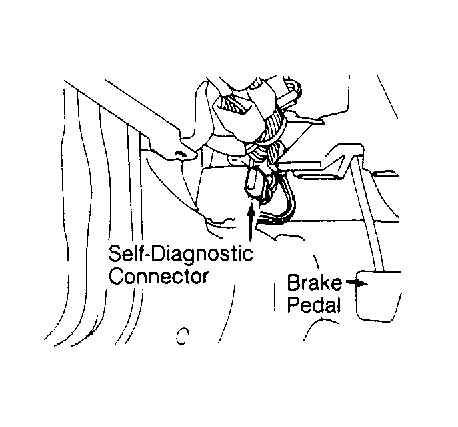 Courtesy of CHRYSLER MOTORS.
- With ignition switch in OFF position, connect DRB-II Mitsubishi adapter to self-diagnostic connector and to DRB-II. Turn ignition switch to RUN position. All DRB-II character positions will glow and copyright information will appear on screen for a few seconds.
- After a few seconds, DRB-II menu will appear. At DRB-II menu, press "4" (SELECT SYSTEM) key to enter diagnostic test program. Select "4" (ABS) key to enter ABS system part of DRB-II program. After a few seconds, SELECT DRIVE TYPE will appear.
- Select "1" for FWD or "2" for AWD. After a few seconds, ABS MENU will appear. Screen will display a menu of DRB-II test categories for anti-lock brake system.
- At ABS menu of anti-lock brake system diagnostic program, specific test functions programmed into DRB-II cartridge can be performed. Following DRB-II modes can be accessed: SYSTEM TEST, READ FAULTS, STATE DISPLAY, ACTUATOR TEST and ADJUSTMENTS.