Front Brake Pads Replacement
WARNING: This page is about a different car, the 2006 Chevrolet Monte Carlo and 2006 Chevrolet Impala. However, it is still accessible from the selected car via links, so may be relevant.
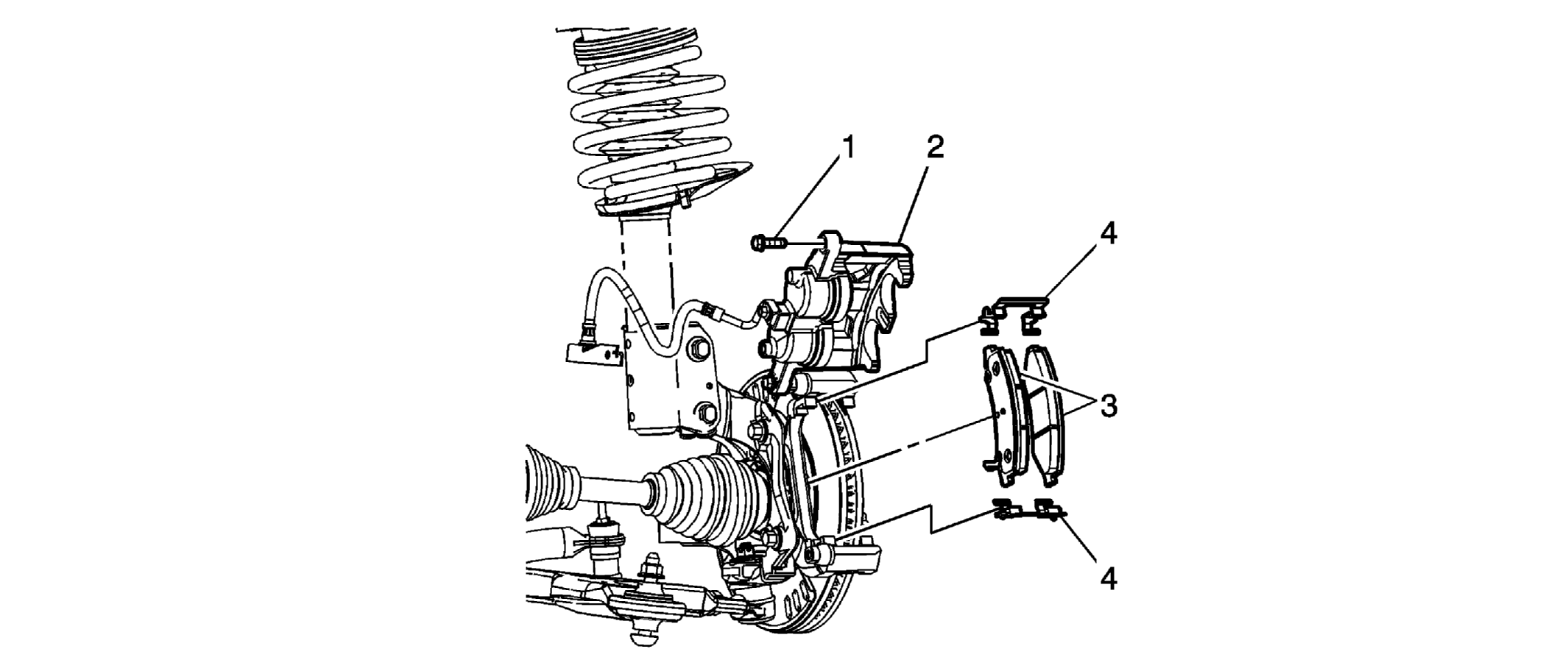 Courtesy of GENERAL MOTORS CORP.
 Brake Pads Replacement - Front
| Callout |
Component Name |
|
Fastener Tightening Specifications:
Refer to Fastener Tightening Specifications . Preliminary Procedure
- Raise the vehicle. Refer to Lifting and Jacking the Vehicle
- Remove the tire and wheel. Refer to Tire and Wheel Removal and Installation
.
|
| 1 |
Bolt Tightening Specification:
Tighten to 36 N.m (26 lb ft).
|
| 2 |
Brake Caliper
Tip:
- Rotate the caliper up and to the rear until it reaches the 12 o'clock position.
- Use a mechanics wire or equivalent to hold the brake caliper in the upright position.
- Using a piece of wood or an old brake pad and a pair of channel locks, gently apply pressure until the pistons are fully seated. BE SURE that the channel locks are CENTERED before applying pressure to seat the pistons.
|
| 3 |
Brake Pads
Tip:
- If removing the brake pads to service the brake system, please note the position of the brake pads for proper installation.
- When replacing the brake pads, ensure that the pad with the wear indicator in positioned on the inside and the wear indicator is pointing down.
- Use denatured alcohol and clean, filtered compressed air to clean the brake Pad area.
|
| 4 |
Brake Pad Springs
Tip:
- If removing the Brake Pad Spring to service the brake system, mark the relationship of the Springs to the Mounting Bracket for proper installation.
- Use NEW Brake Pad Springs ONLY when replacing the Brake Pads.
|