Removal Procedure
- Remove the front side door inside handle (2). Refer to DOOR HANDLE REPLACEMENT - FRONT INSIDE .
- Remove the outside rearview mirror opening cover (1).
- Remove the screw which secures the front side door pull handle (3).
- Gently pry the front side door trim panel (4) from the front side door by disengaging the plastic retainers which secure the panel.
- Position the door trim panel (4) away from the door in order to gain access to the right front side window switch electrical connector.
- Disconnect the window switch electrical connector.
- Remove the door trim panel (4) from the vehicle.
- Remove the front side window switch from the door trim panel (4) by releasing the 4 plastic retaining tabs.
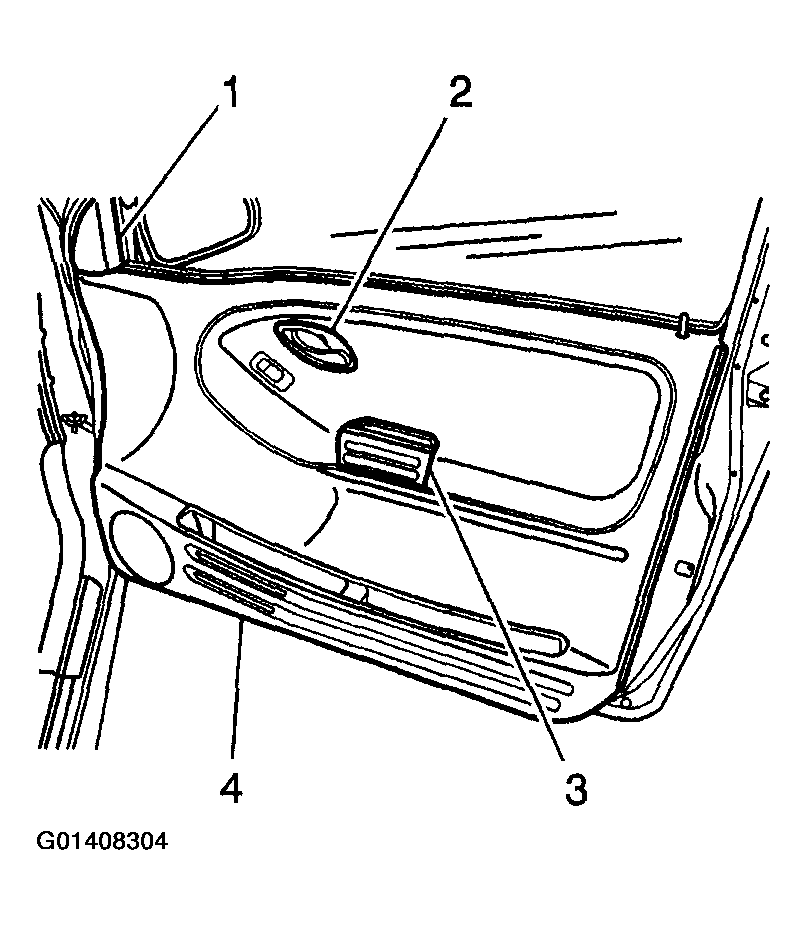 Courtesy of GENERAL MOTORS CORP.