Removal Procedure
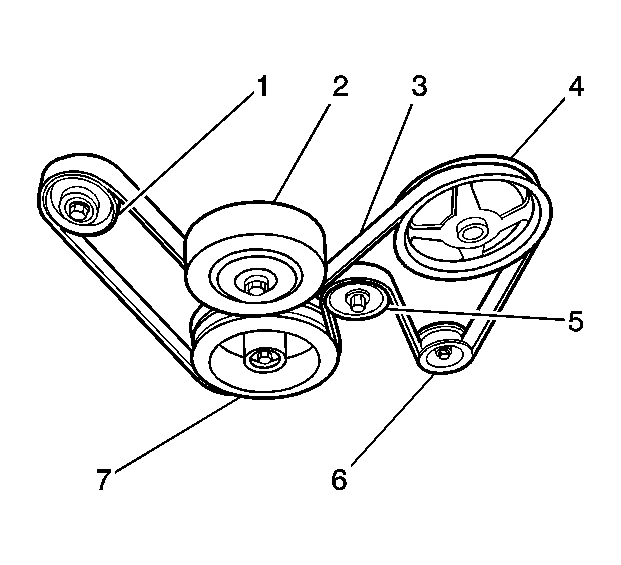 Courtesy of GENERAL MOTORS CORP.
- Disconnect the battery negative cable. Refer to Battery Negative Cable Disconnection and Connection .
- Remove the air cleaner assembly. Refer to Air Cleaner Assembly Replacement
.
- Remove the radiator fan assembly. Refer to Cooling Fan Replacement - Electric (LP1, LY7)
or Cooling Fan Replacement - Electric (LS2)
.
- Remove the accessory drive belt (3). Refer to Drive Belt Replacement - Accessory
.
- Remove the bolt securing the power steering pressure hose bracket to the generator.
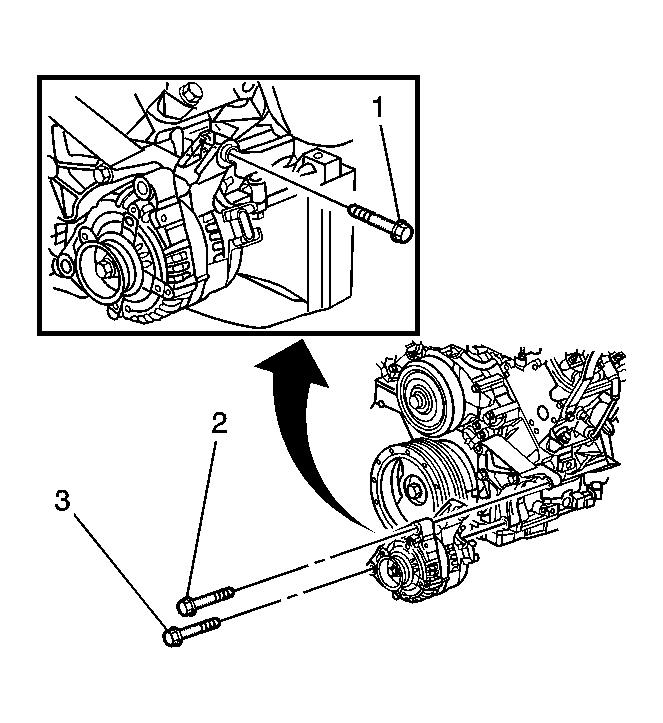 Courtesy of GENERAL MOTORS CORP.
- Remove the rear generator mounting bolt (1).
- Remove the front generator mounting bolts (2,3).
- Lift the generator off of the mounting bracket in order to gain access to the connector and the generator output BAT terminal nut.
- Disconnect the wire harness electrical connector from the generator.
- Reposition the protective boot from the generator output battery terminal for access.
- Remove the generator output battery terminal nut and disconnect the battery positive lead from the generator.
- Remove the generator from the vehicle.