Removal Procedure
- Remove the rear compartment trim. Refer to Compartment Front Trim Panel Replacement - Rear
in Body Rear End.
- Disconnect the electrical connector from the cellular telephone module.
- Remove the four fasteners (3) retaining the Cellular telephone module and bracket assembly (2) to the rear shelf carrier (1).
- Remove the Cellular telephone module and mounting bracket assembly (2) from the rear shelf carrier.
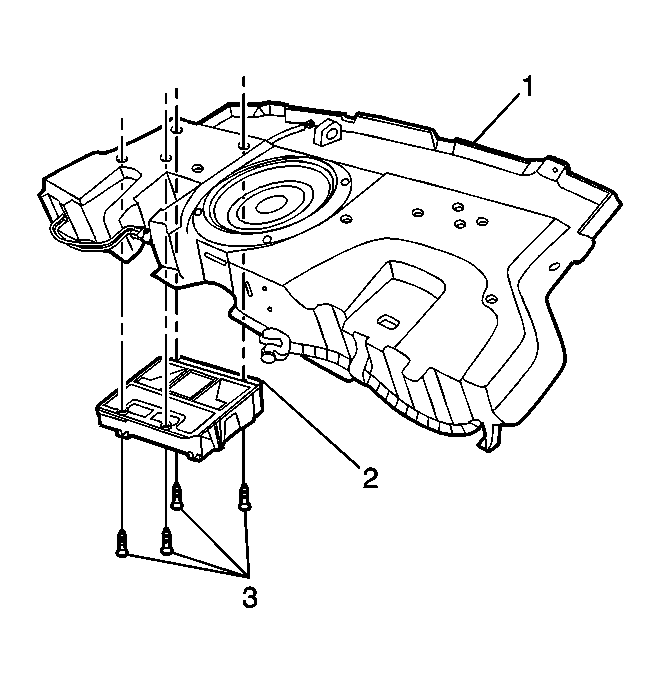 Courtesy of GENERAL MOTORS CORP.
- Release the Cellular telephone module mounting bracket retaining tabs (2) and slide the Cellular telephone module (3) out of the mounting bracket (1).
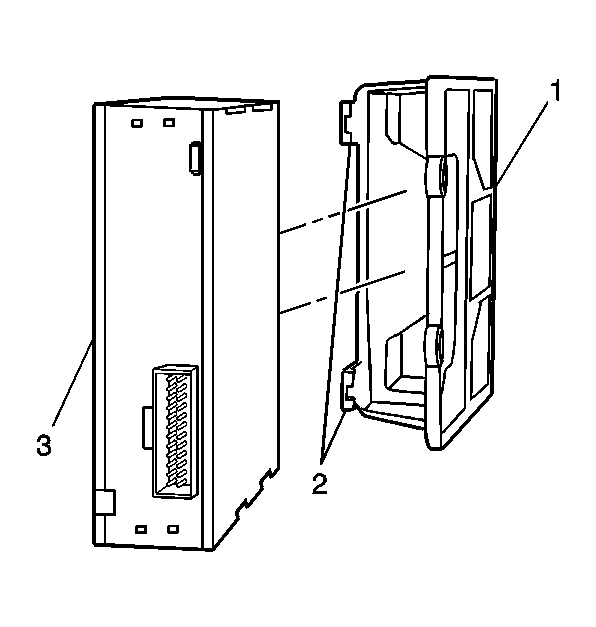 Courtesy of GENERAL MOTORS CORP.