Scan Tool Does Not Communicate With Class 2 Serial Data Line
- Connect scan tool to another vehicle and ensure proper operation of scan tool. If scan tool cannot communicate with another vehicle, refer to manufacturer of scan tool. If scan tool can communicate with another vehicle, go to next step.
- Turn ignition off. Ensure connections at Data Link Connector (DLC) are clean and tight. DLC is located under instrument panel, left of steering column. Check for any terminals that are not seated properly. Repair as necessary. If connections of DLC are okay, go to next step.
- Turn ignition on. Using a DVOM, check for battery voltage between DLC connector terminals No. 4 and 16. Check for battery voltage between DLC terminals No. 5 and 16. See Fig 1
. If battery voltage is measured between specified terminals, go to step 7). If battery voltage does not exist between specified terminals, go to next step.
- Check for voltage between DLC connector terminal No. 16 and chassis ground. If battery voltage exists, go to next step. If battery voltage does not exist, repair open or short in Orange wire of DLC connector terminal No. 16.
- Check for battery voltage between DLC connector terminals No. 5 and 16. If battery voltage exists, go to next step. If battery voltage does not exist, locate and repair open in Black/White wire of DLC connector terminal No. 5.
- Check for battery voltage between DLC connector terminals No. 4 and 16. If battery voltage exists, go to next step. If battery voltage does not exist, locate and repair open in Black wire of DLC connector terminal No. 4.
- Turn ignition off. Disconnect all modules of class 2 serial data line. Turn ignition on. Using a DVOM, check for battery voltage between DLC connector terminal No. 2 and ground. See Fig 1
. If battery voltage exists, repair short to voltage in Purple wire of DLC connector terminal No. 2. If battery voltage does not exist, go to next step.
- Using a DVOM, measure resistance between DLC connector terminal No. 2 and ground. See Fig 1
. If resistance is less than 5 ohms, go to next step. If resistance is greater than 5 ohms, locate and repair short to ground in Purple wire of DLC connector terminal No. 2.
- Restore connections to class 2 serial data modules one at a time, in the following order. Establish communications with each module after restoring connection. If communications can not be established with last module connected, replace that module.
- Driver Door Module (DDM)
- Cellular Telephone Module (If Equipped)
- Remote Function Actuator (RFA) Module
- Sensing Diagnostic Module (SDM)
- Pass-Key(R) III Module
- Instrument Panel Cluster (IPC)
- HVAC Programmer
- Standard Body Module (SBM)
- Powertrain Control Module (PCM)
- Electronic Brake Traction Control Module (EBTCM)
- Memory Seat Module (if equipped)
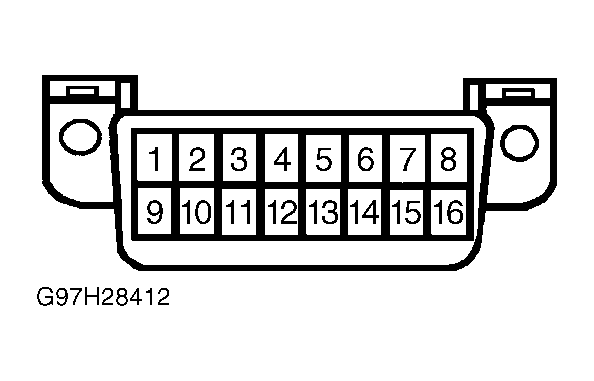 Courtesy of GENERAL MOTORS CORP.