BMW Connected Google Android: Troubleshooting
If problems occur when establishing the connection, the customer can perform a self-diagnosis. This self-diagnosis feature is integrated in the application software to support identification of the problem source. The procedure for performing the self-diagnosis is self-explanatory. Proceed as follows:
- Do not connect terminal device to the vehicle. Disconnect terminal device from vehicle, if necessary.
- Start the application software.
- Select the button with the gear symbol (settings) (1 - illustration FB8413004).
- Select the "Check connection" button (1 - illustration FB8413003).
- Connect terminal device to vehicle. The self-diagnosis then starts automatically.
- An acoustic test signal will sound when the self-diagnosis routine is completed. If this test signal in the application software is heard then it should be confirmed. Once the test signal is confirmed the self-diagnosis routine has been successfully completed and no vehicle malfunctions are present.
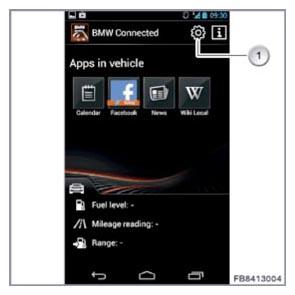 Courtesy of BMW OF NORTH AMERICA, INC. Courtesy of BMW OF NORTH AMERICA, INC.
|
| Item |
Explanation |
| 1 |
"Settings" selection button |
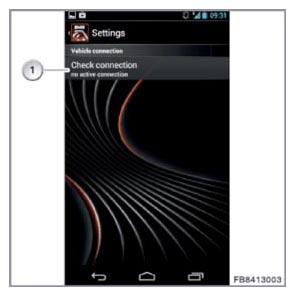 Courtesy of BMW OF NORTH AMERICA, INC. Courtesy of BMW OF NORTH AMERICA, INC.
|
| Item |
Explanation |
| 1 |
"Check connection" button |