Input Shaft (Mainshaft) Speed Sensor Replacement
- Raise the vehicle on a lift, or apply the parking brake, block both rear wheels, and raise the front of the vehicle. Make sure it is securely supported.
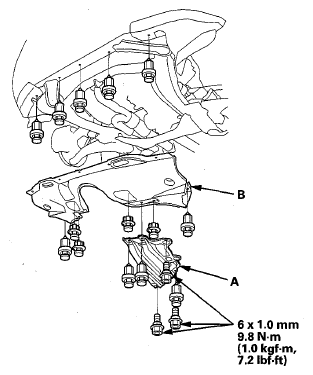
- Remove the front undercover (A) and the splash shield (B).
 Courtesy of AMERICAN HONDA MOTOR CO., INC.
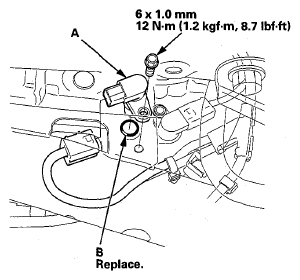
- Disconnect the input shaft (mainshaft) speed sensor connector, and remove the input shaft (mainshaft) speed sensor (A).
 Courtesy of AMERICAN HONDA MOTOR CO., INC.
- Apply ATF to a new O-ring (B), and install the O-ring over the input shaft (mainshaft) speed sensor. Then install the input shaft (mainshaft) speed sensor.
- Check the connector for corrosion, dirt, or oil, and clean or repair if necessary, then connect the connector securely.
- Install the splash shield and the front undercover.