Wheel Sensor Replacement: Rear
- Make sure the ignition switch is in LOCK (0)
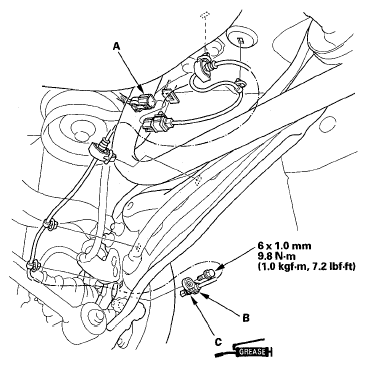
- Disconnect the wheel sensor connector (A).
 Courtesy of AMERICAN HONDA MOTOR CO., INC.
- Remove the clips, the bolt, and the wheel sensor (B).
- Install the wheel sensor in the reverse order of removal, and note these items:
- Apply multipurpose grease to the O-ring (C).
- Install the sensor carefully to avoid twisting the wires.
- If the wheel sensor comes in contact with the hub bearing unit, it is faulty.
- Start the engine, and check that the ABS and the VSA indicators go off.
- Test-drive the vehicle, and check that the ABS and the VSA indicators do not come on.