Switch Test
- Remove the driver's dashboard lower cover (see
DRIVER'S DASHBOARD LOWER COVER REMOVAL/INSTALLATION
).
- Disconnect the 5P connector (A) from the switch (B).
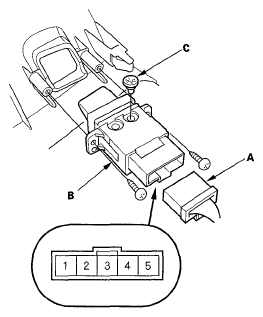 Courtesy of AMERICAN HONDA MOTOR CO., INC.
- Check for continuity between the No. 1 and No. 2 terminals.
- With the switch pressed, there should be continuity.
- With the switch released, there should be no continuity.
- If the continuity check is not as specified, remove the two screws and replace the switch.
- Check for continuity between the No. 3 and No. 4 terminals. If there is no continuity, replace the bulb (C).