Oil Pump Chain Replacement: Removal
- Remove the drive belt (see
DRIVE BELT REMOVAL/INSTALLATION
).
- Remove the cam chain (see
CAM CHAIN REMOVAL
).
- Remove the power steering (P/S) pump. Do not disconnect the P/S hoses from the pump (see step 21 under ENGINE REMOVAL
).
- Attach the universal eyelet to the drive belt auto-tensioner (see step 54 under ENGINE REMOVAL
).
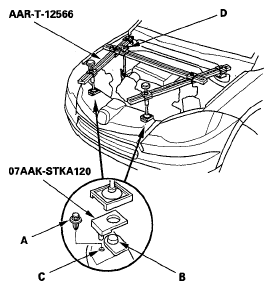
- Remove the top corner clip (A) from the front grill on both sides. Place the engine support mount pads over the hood edge cushions (B), and align the pins with the clip hole (C). Remove the lids from both side of the cowl cover. Install the engine support hanger (AAR-T-12566), then attach the hook to the universal eyelet. Tighten the wing nut (D) by hand to lift and support the engine/ transmission assembly.
 Courtesy of AMERICAN HONDA MOTOR CO., INC.
- Remove the oil pan (see
OIL PAN REMOVAL
).
- Install the crankshaft pulley.
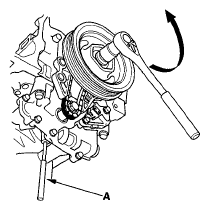
- To hold the rear balancer shaft, insert the 6 mm pin punch (A) into the maintenance hole in the balancer shaft holder and through the rear balancer shaft.
 Courtesy of AMERICAN HONDA MOTOR CO., INC.
- Turn the crankshaft counterclockwise to compress the oil pump chain auto-tensioner.
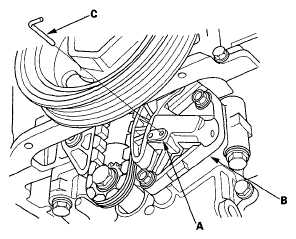
- Align the holes on the lock (A) and the oil pump chain auto-tensioner (B), then insert a 1.5 mm (0.06 in.) diameter pin (C) into the holes. Turn the crankshaft clockwise to secure the pin.
 Courtesy of AMERICAN HONDA MOTOR CO., INC.
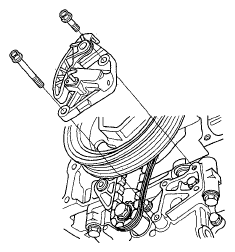
- Remove the oil pump chain auto-tensioner.
 Courtesy of AMERICAN HONDA MOTOR CO., INC.
- Remove the crankshaft pulley.
- Remove the oil pump chain guide.
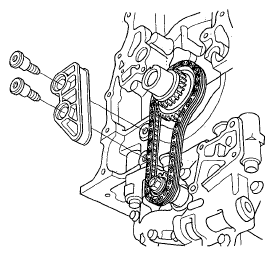 Courtesy of AMERICAN HONDA MOTOR CO., INC.
- Loosen the oil pump sprocket mounting bolt.
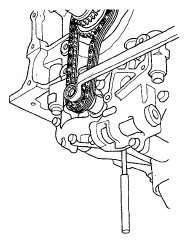 Courtesy of AMERICAN HONDA MOTOR CO., INC.
- Remove the oil pump chain.
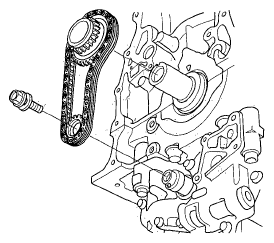 Courtesy of AMERICAN HONDA MOTOR CO., INC.