Horn Switch Test
- Remove the steering column covers (see
COLUMN COVER REMOVAL/INSTALLATION
).
- Disconnect the dashboard wire harness 20P connector (A) from the cable reel (B).
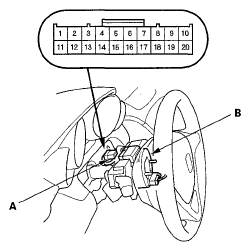 Courtesy of AMERICAN HONDA MOTOR CO., INC.
- Using a jumper wire, connect the dashboard wire harness 20P connector No. 2 terminal to body ground. The horns should sound.
- If the horns sound, go to step 4.
- If the horns do not sound, check these items:
- No. 11 (15 A) fuse in the main under-hood fuse box.
- Horn (see HORN TEST/REPLACEMENT
)
- MICU
- An open in the wire.
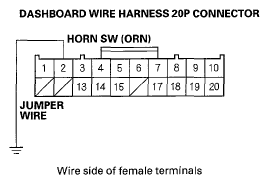 Courtesy of AMERICAN HONDA MOTOR CO., INC.
- Reconnect the dashboard wire harness 20P connector (A) to the cable reel (B).
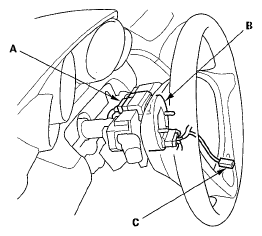 Courtesy of AMERICAN HONDA MOTOR CO., INC.
- Remove the driver's airbag assembly (see
DRIVER'S AIRBAG REPLACEMENT
), and disconnect the horn switch 1P terminal (C) from the driver's airbag.
- Check for continuity between the dashboard wire harness 20P connector No. 2 terminal and the horn switch 1P terminal.
- If there is continuity, check the installation of the driver's airbag assembly and the steering wheel. If the installation is correct, faulty horn switch; replace the driver's airbag assembly.
- If there is no continuity, repair an open in the wire between the cable reel and the horn switch 1P terminal, if the wire harness is OK, replace the cable reel (see
CABLE REEL REPLACEMENT
).
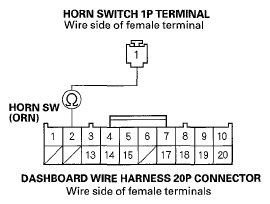 Courtesy of AMERICAN HONDA MOTOR CO., INC.