Steering Column Removal and Installation: Installation
- Install the steering column and make sure the wires are not caught or pinched by any parts.
- Take care not to let the sliding plates fall out of position during column installation.
- Make sure the wires are not caught or pinched by any parts.
- Insert the upper end of the steering joint onto the steering shaft (A) (line up the bolt hole (B) with the flat portion (C) on the shaft).
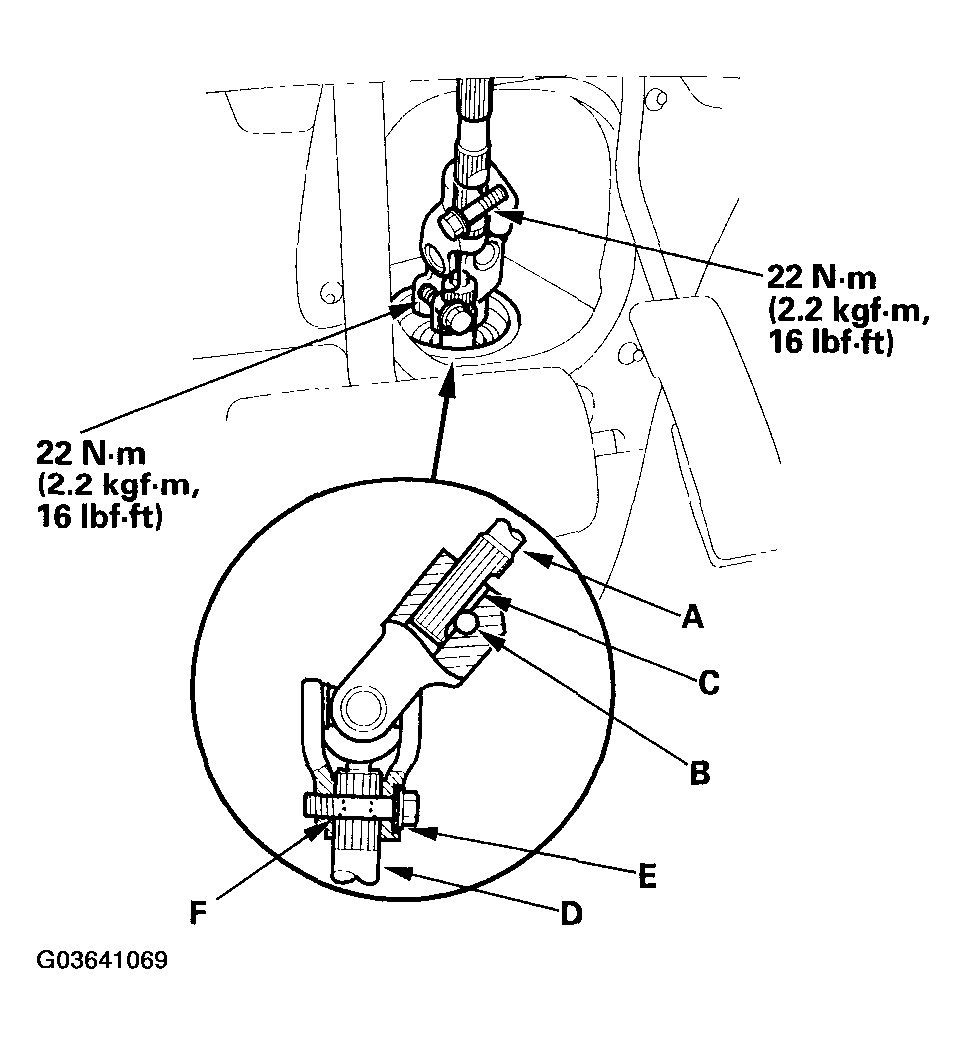 Courtesy of AMERICAN HONDA MOTOR CO., INC.
- Slip the lower end of the steering joint onto the pinion shaft (D) (line up the bolt hole (E) with the groove (F) around the shaft), and loosely install the lower joint bolt. Be sure that the lower joint bolt is securely in the groove in the pinion shaft.
- Pull on the steering joint to make sure that the steering joint is fully seated. Then install the upper joint bolt and tighten it. Tighten the lower joint bolt to the specified torque.
- Finish the installation in the reverse order of disassembly, and note these items:
- Make sure the wire harness is routed and fastened properly.
- Make sure the connectors are properly connected.
- Reinstall the steering wheel (see STEERING WHEEL INSTALLATION
).
- Reconnect the battery.
- Verify cruise control, horn, radio remote, and turn signal switch operation.
- Make sure the steering wheel is centered.